
 "
"
Best Collaboration Tools for Business (Slack, ClickUp & WordPress Alternatives)






TL;DR
Most businesses patch together Slack for chat, Trello for tasks, and Confluence for docs — then wonder why collaboration still feels fragmented. The tools on this list each do one thing well, but none of them do everything. If you’re managing three or more separate platforms, a WordPress-based intranet like Woffice gives you project management, document sharing, HR, and team communication in one self-hosted system — one login, one dashboard, one subscription.
Top Collaboration Tools for Business (and Flexible WordPress Alternatives Like Woffice)
Modern businesses now have a range of collaboration tools they can use to communicate, manage projects, and share information. These tools include messaging programs like Slack and project boards like Trello.
Most businesses eventually realize that modern collaboration tools have one major limitation: They are not designed to work with one another. It can require one program for collaboration, another for project management, a different one for documentation, and a separate intranet that links all these tools together. Using multiple programs like this often adds a lot of inefficiencies to your workflow and can be very costly.
Because of this, many businesses have begun to seek collaboration tools that combine all necessary functions into one program and can be operated on their own server. Woffice is a great example of a program that provides all necessary functions and is built on WordPress.
Woffice – All-in-One WordPress Collaboration Platform
Before diving into individual tools, it’s worth understanding what a unified collaboration solution actually looks like.
Woffice is a WordPress-based intranet and collaboration platform that combines project management, document sharing, HR features, team communication, and knowledge base management inside a single, fully customizable system. Unlike SaaS tools that charge per user and lock you into their ecosystems, Woffice lets you easily self-host your entire collaboration environment on WordPress.
It’s built on WordPress, which means it’s infinitely extensible. Admins can easily manage it, and everyone else can enjoy a clean, professional intranet without requiring any WordPress knowledge.
Woffice is a strong fit for businesses that:
- Are tired of managing 4–6 separate SaaS subscriptions
- Need full data ownership and self-hosted control
- Want a single hub for projects, documents, HR, and internal communication
- Are already in the WordPress ecosystem
Comparison: Popular Collaboration Tools vs. Woffice
| Tool | Best for | Key limitation |
| Slack | Real-time messaging | No intranet, limited document system |
| ClickUp | Task and project management | Complex setup, no unified intranet |
| Trello | Visual kanban boards | Limited for documentation or HR |
| Confluence | Team documentation | Expensive at scale, limited flexibility |
| Figma | Design collaboration | Single-function only |
| Woffice | All-in-one intranet/extranet collaboration | Requires WordPress setup |
Free Online Collaboration Tools for Business
If you’re not ready for a full intranet solution yet, these free and freemium tools cover individual collaboration needs reasonably well. Even most businesses eventually end up using three or more of these simultaneously.
Team Communication Tools
Slack
Slack is the most widely used team messaging platform available. It organizes communication into channels by topic, team, or project, making it easy to share files, comment on work, and keep conversations contextual. The Pro plan also includes group calls and video conferencing.
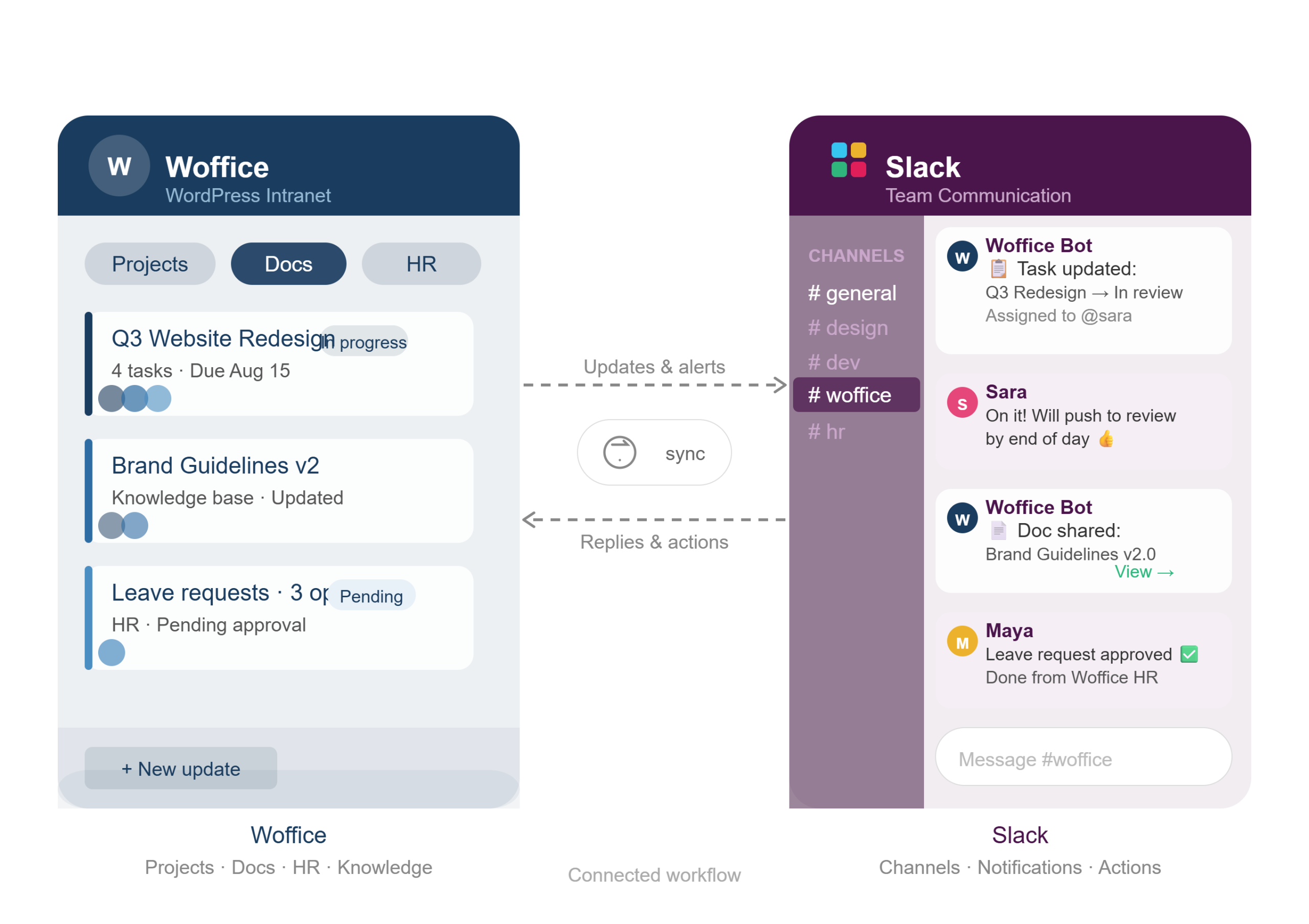
Slack is excellent for real-time communication. However, it does not offer an intranet, document management system, or project tracking. Many businesses end up pairing Slack with Woffice to centralize communication alongside internal resources, HR tools, project management, and knowledge bases rather than individually managing them.
Chanty
Chanty is a freemium, AI-powered team chat offering unlimited messages at no cost. It’s a clean Slack alternative for startups and small-to-medium teams that want straightforward internal messaging without the pricing complexity.
Like Slack, Chanty covers communication well but requires additional tools for document management, task tracking, or intranet functionality.
Video Meetings and Conferencing
Whereby
Appear.in (now called Whereby) is a browser-based meeting tool built around simplicity. You register a room, share the link, and your team joins. It supports screen sharing via a Chrome extension, accommodates up to four participants on the free plan, and works on mobile. It’s one of the lowest-friction meeting solutions available.
Livestorm
Livestorm started as a webinar platform and expanded into team meetings. It offers private rooms, in-meeting chat, and direct integration with its webinar suite, making it a solid choice for teams that regularly host both internal meetings and client-facing sessions from a single tool.
Design and Document Collaboration Tools
Figma
Figma is a browser-based design and prototyping tool with built-in real-time collaboration. Designers, product managers, and stakeholders can work on the same file simultaneously, eliminating the back-and-forth of versioned exports. It significantly reduces feedback loop friction, especially for remote teams doing both high-end and low-end visual work.
Figma handles design collaboration specifically but does not function as a general-purpose intranet or document system.
Nira
Nira collects documents from Google Drive, Slack, Dropbox, and other interconnected applications and aggregates them into a single searchable document collection. Nira has been designed primarily for work teams that are overwhelmed with the disarray of documents on different applications. However, document aggregation software (such as Nira) tries to solve a problem that is an effect of application fragmentation. For example, Woffice has a built-in document management system that eliminates the need for document aggregation tools.
Time Tracking Software
Time Doctor
Time Doctor is a detailed time tracking tool with analytics on how workday hours are spent. It includes computer session monitoring, screenshot recording, invoicing, and reporting while making it particularly useful for remote teams or agencies billing by the hour.
Toggl
Toggl is a free alternative for teams that need basic time tracking without the monitoring features.
Project Management Tools
Trello
Trello remains one of the most accessible kanban-based project management tools available. Its board-and-card system is intuitive enough for non-technical users and flexible enough for a wide range of use cases from content calendars to client management to sprint planning.
Where Trello falls short: it has no documentation system, no HR features, and no intranet layer. For teams that grow beyond simple task tracking, Trello usually gets supplemented by several other tools. Woffice includes built-in project management alongside the rest of your collaboration infrastructure while removing the need to stitch tools together.
ClickUp
ClickUp is a more feature-rich project management platform with multiple views — Kanban, list, calendar, and Gantt, etc. Its UX is polished, and it’s a legitimate upgrade from Trello for teams managing complex projects.
ClickUp’s limitation is scope: it’s built around task management and does not provide intranet functionality, internal knowledge bases, or HR tools. Teams using ClickUp often still need a separate platform for documentation and company-wide communication, which is the gap Woffice addresses as a unified solution.
Todoist
Todoist is a focused task and to-do list manager. It offers categories, filters, calendar integrations, and light collaboration features. Best suited for individuals or very small teams managing personal task backlogs rather than team-wide project coordination.
All-In-One Collaboration Solutions and Intranets
Rather than creating isolated systems, collaboration strategies begin to evolve with the tools at this level. These tools fill distinct needs and do so effectively. However, organizations with expanding teams eventually realize that managing separate subscriptions to tools is often more of a hindrance than a solution.
Woffice
Woffice is the leading WordPress-based intranet and collaboration platform. It combines:
- Project management — task boards, milestones, team assignments
- Knowledge base and documentation — internal wikis, policies, resources
- HR features — leave management, staff directories, org charts
- Member management — roles, permissions, member maps
- Internal communication — forums, announcements, activity feeds
- E-learning — corporate courses and training content
Unlike SaaS platforms that charge per seat and hold your data on their servers, Woffice runs on WordPress. You can extend or customize it however your business requires. The admin manages it; end users interact with a clean, professional intranet interface.
For businesses already in the WordPress ecosystem, or for teams ready to move beyond fragmented SaaS stacks, Woffice is built to be the single platform that replaces most of the individual tools listed above.
Confluence
Confluence is Atlassian’s team documentation and knowledge management platform. It handles project planning notes, meeting documentation, and shared written resources well, and integrates tightly with Jira for development teams.
The limitation at scale: Confluence can become expensive quickly with per-user pricing, and its flexibility is constrained compared to a self-hosted platform. It also requires additional Atlassian tools (like Jira) to approach the feature depth Woffice offers natively.
What Is the Best All-in-One Collaboration Solution for Business?
Most businesses don’t need more individual tools — they need fewer, better-integrated ones.
Running Slack for messaging, Trello for tasks, Confluence for documentation, and a separate HR tool means four subscriptions, four data silos, four login points, and four sets of admin overhead. This is a productivity drag that grows as your team does.
A unified collaboration system, like Woffice, integrates all of these collaborative tools into one system using WordPress. Communication, management of tasks, documentation, HR, and other internal resources are all located in one system that is accessible with one organizational login and one administrative dashboard.
When collaboration tools are being evaluated in 2026, the question that needs answering is whether or not the collaborative tools used are creating more of an obstacle to productivity than they are solving. A unified intranet system that is not integrated can be used more effectively.
👉 Explore Woffice — the all-in-one WordPress collaboration platform
Recommended Reading on Collaboration and Productivity
If you want to go deeper on building better working habits alongside better tools:
Deep Work by Cal Newport makes a compelling case for distraction-free, focused work, and is one of the most practically useful books on the topic of productive output.
Atomic Habits by James Clear is the definitive modern guide to building habits that stick. It is useful for teams trying to establish consistent collaboration rhythms, not just individual productivity.
Wrap Up
The right collaboration setup depends on your team size, workflow complexity, and how much overhead you’re willing to carry across multiple platforms. Individual tools like Slack, Trello, and ClickUp each do their specific job well. But for businesses that have outgrown the patchwork approach, an all-in-one intranet platform like Woffice offers a fundamentally more efficient way to work.
If you’re evaluating your collaboration stack and want a self-hosted, fully customizable alternative to the usual SaaS bundle — Woffice is worth a serious look.
Frequently Asked Questions
What is the best all-in-one collaboration tool for business?
There’s no single answer for every team, but for businesses that want full control over their data and a unified system that handles projects, documentation, HR, and communication, Woffice is one of the strongest options available. It runs on WordPress, so it’s self-hosted and fully customizable, unlike SaaS tools that lock you into their ecosystem and charge per user.
What is the difference between Slack and an intranet like Woffice?
Slack is a real-time messaging platform. It’s also excellent for day-to-day team communication but doesn’t offer document management, project tracking, HR tools, or a central knowledge base. An intranet like Woffice covers all of those functions in one place. Many businesses use both together: Woffice as the system of record and Slack as the communication layer on top.
Is Woffice a good alternative to Confluence?
Yes, particularly for teams that want more flexibility and don’t want to pay Atlassian’s per-user pricing at scale. Woffice includes a knowledge base and documentation system alongside project management, HR features, and member management, allowing it a broader solution than Confluence, which focuses primarily on documentation and integrates best within the Atlassian stack.
Can small businesses use collaboration tools like ClickUp and Trello for free?
Both ClickUp and Trello offer free plans that work well for small teams with straightforward project management needs. The limitation is scope as teams grow, they typically need documentation, communication, and HR tools alongside task management, which means adding more subscriptions. At that point, an all-in-one platform becomes more cost-effective than running four separate tools.
Why should a business consider a self-hosted collaboration platform?
Self-hosted platforms like Woffice give businesses full ownership of their data. Nothing lives on a third-party server, and there’s no vendor dependency risk. You pay once for the license rather than monthly per user, and the platform can be customized or extended however your business requires. For industries with data privacy requirements, or for businesses that have simply outgrown the SaaS patchwork model, self-hosting is often the more sustainable long-term choice.